7 min read
Explainable AI UX: patterns for "why am I seeing this?"
As products make more decisions on the user's behalf, trust becomes an interface problem. These are the patterns that make AI legible instead of magical.
AItrustUX patterns

AI & Design
AI is moving from answering to acting. When software books, buys, and sends on your behalf, the interface’s job shifts to keeping people in control. Here are the patterns that matter, from approval gates to reversibility, and why recent prompt-injection findings make the human checkpoint a safety control.
TL;DR
For most of software’s history the interface showed you things and you decided what to do. AI agents break that arrangement. They do not just answer, they act: they book, buy, send, file, and change things on your behalf, sometimes over several days without you watching. In the past few weeks that shift stopped being theoretical. Assistants shipped with persistent identities and multi-day memory, a payment product introduced a pattern where an agent proposes a transaction and a human signs it with a passkey, and security researchers demonstrated that a browser agent could be manipulated through hidden instructions into taking actions its user never intended. Put together, those developments point at a new design problem. The question is no longer "how do we present the answer clearly." It is "how does a person stay in control of software that acts for them." This is a working set of patterns for that problem.
The short version, stated first because that is how these pieces should be written: the approval gate is the product. When an agent can do something that costs money, sends a message, or cannot be undone, the moment a human reviews and commits that action is not a speed bump bolted onto the feature. It is the feature’s most important surface, and it deserves more design attention than the agent’s cleverness does.
A recommendation is cheap to be wrong about. You read it, you ignore it, nothing happened. An action is not, because by the time you notice it is wrong, it already happened. That single difference invalidates a lot of inherited UX instinct. Confidence you could afford to hide in a recommendation now has to be visible before an action. An undo you treated as a nicety becomes a core control. A permissions screen nobody read becomes the thing standing between an agent and your bank account. Designing agent experiences means treating every autonomous action as something a person needs to see, understand, and be able to stop, and building the interface around that need rather than around the impressive fact that the software can act at all.
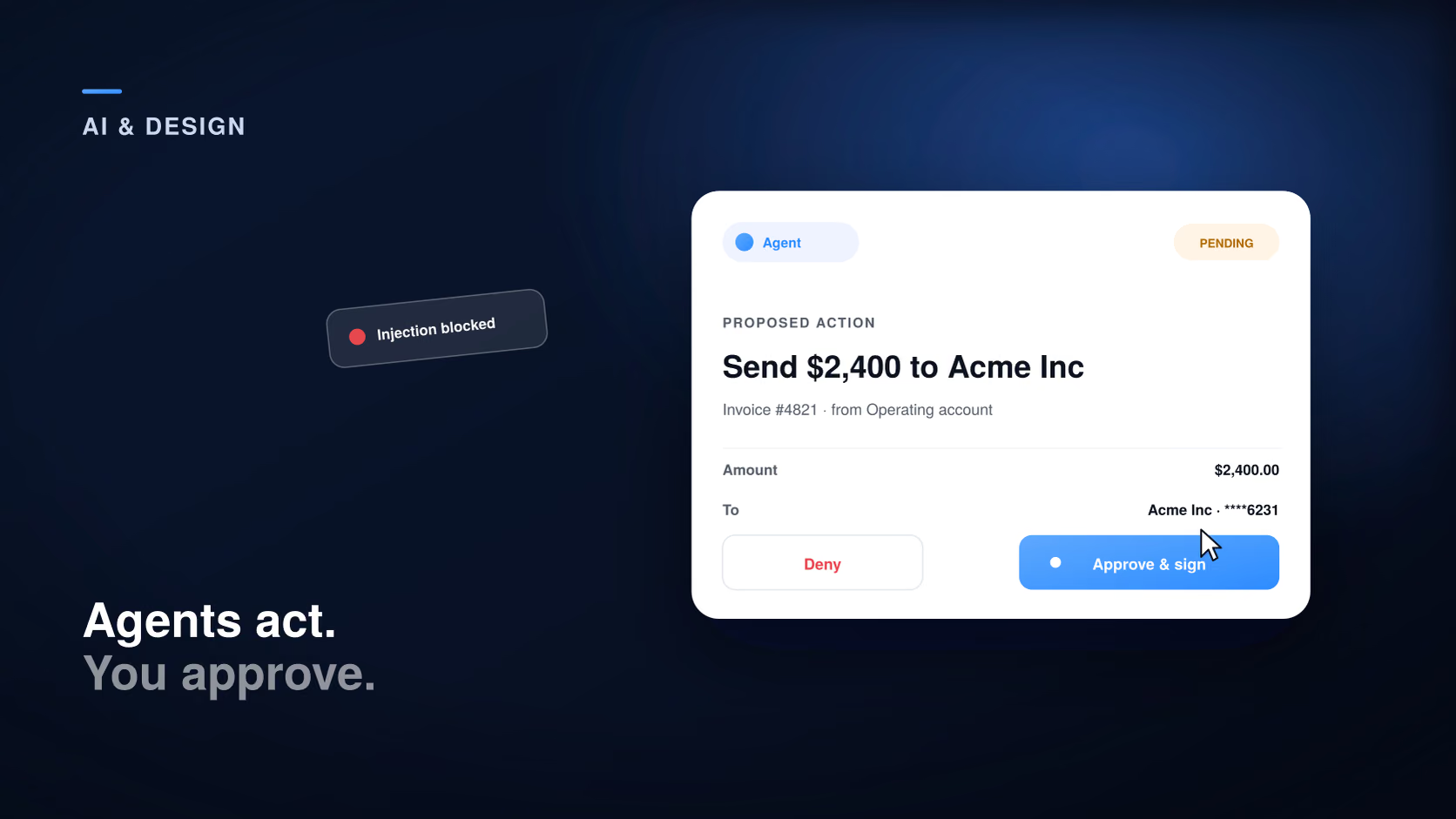
Here is the uncomfortable fact that should shape the whole design. An agent that reads web pages, emails, or documents is reading untrusted content, and that content can contain instructions aimed at the agent rather than the user. This is prompt injection, and it is not hypothetical: researchers recently showed a browser agent being steered into unauthorized actions by text hidden in a page. The security industry responded by treating agents as first-class actors that need their own permissions, discovery, and audit, the way you would treat a new employee with system access rather than a feature. For a designer the implication is direct. You cannot rely on the agent to always know a request is malicious, so the human checkpoint is not there to catch the occasional model mistake. It is a genuine safety control against an agent that has been socially engineered, and it should be designed with that seriousness.
The core pattern is simple to state and easy to get wrong. The agent proposes an action and shows exactly what it will do, in specific terms, and a human commits it with a clear, deliberate confirmation. The payment product mentioned above is a clean example: the agent assembles the transaction, but a person signs it with a passkey, so the agent can prepare but never unilaterally spend. The design details are where this succeeds or fails. Show the concrete values, the real amount, the real recipient, the real thing being changed, not a vague "the assistant wants to take an action." Make the approval a positive, deliberate act rather than a pre-checked box someone taps through. And never use a dark pattern to nudge approval, because the entire point of the gate is that the human, not the agent and not the growth metric, is in control at that moment.
| What the agent wants to do | Default treatment |
|---|---|
| Read or summarize information | Act automatically, no gate |
| A reversible, low-stakes change | Act, then show a clear undo |
| Spend money, or send an external message | Human approval gate, with specifics shown |
| Delete data or anything irreversible | Explicit review and confirm before commit |
| Anything it cannot clearly explain | Block, and ask the person |
The best way to make an action safe is to make it cheap to undo, because a reversible action barely needs a gate at all. Where you can offer an undo, offer it, and make it visible for long enough that a person who looks away and back still catches a wrong move. Where an action genuinely cannot be undone, spending real money, sending a message a customer will read, deleting something, the equivalent is a review step before the action commits, so the person confirms while the decision is still cheap to change. This is the same principle behind good explainable AI interfaces, applied to a world where the software acts rather than only suggests: keep the cost of a wrong decision as close to zero as the action allows.
When an agent acts, a person should always be able to tell that it was the agent and not themselves, what that agent was allowed to do, and what it actually did. Assistants now ship with distinct agent identities partly for this reason, and the design job is to surface that clearly rather than blur the line between the human and the software acting in their name. Three things belong in the interface. A visible marker whenever an agent, rather than the user, took an action. A plain statement of the agent’s current scope, what it can and cannot do without asking, so nobody is surprised by the extent of its reach. And an audit trail of what it did, readable by a normal person, not buried in a developer log. The governance tools that launched recently treat agents as actors with permissions and histories; the consumer-facing version of that idea is simply honesty in the interface about who is doing what.
Design the deny path as carefully as the approve path
Refusing or correcting an agent has to be at least as easy as letting it proceed, and the safe choice should be the default when a person hesitates. If denying is buried while approving is one tap, you have built a system that drifts toward action, which is exactly the failure mode an approval gate exists to prevent.
Agents increasingly run across days, holding state between sessions and picking work back up on their own. That is genuinely useful and quietly risky, because work that happens while you are not watching is work you did not see. The design response is to make long-running agent activity legible after the fact: a clear status for what is in progress, a simple way to see what happened while you were away, and an easy point to resume, pause, or stop. Persistent memory should make the agent more helpful without making its actions less visible, and the test is whether a person who steps away for a day can come back and understand, in under a minute, everything the agent did in their absence.
Before shipping an agent that acts, run it against six questions. Does every autonomous action fall into a clear bucket, automatic, undoable, or gated, based on its stakes? Are high-stakes actions gated with the specific details shown, not a vague prompt? Is there an undo wherever the action allows one? Can a person always tell when the agent, rather than they, acted? Is the deny path as easy as the approve path, with the safe choice as the default? And can someone reconstruct what the agent did while they were away? Six yeses is an agent a person can actually stay in control of, which, when the agent can be fooled, is the difference between a helpful feature and a liability.
When software can act for you, the interface’s real job is not to show how smart the agent is. It is to keep you in control of what it does in your name.
What is agent UX?
Agent UX is the design of interfaces for AI that acts on a person’s behalf rather than only answering questions. Its central concern is keeping the person in control of autonomous actions through approval gates, reversibility, and visible agent identity and limits.
What is an approval gate, or human-in-the-loop, for AI agents?
It is the pattern where the agent proposes an action and shows exactly what it will do, and a human reviews and commits it. It is used for high-stakes or irreversible actions like spending money, sending external messages, or deleting data, so the software can prepare but not unilaterally act.
Why does prompt injection matter for interface design?
Because an agent that reads untrusted content, web pages, emails, documents, can be steered by hidden instructions into actions its user never intended, as recent demonstrations have shown. That makes the human approval step a genuine safety control rather than a nicety, and it should be designed with that seriousness.
Which agent actions need human approval?
Actions with real or irreversible consequences: spending money, sending messages to other people, deleting data, or anything the agent cannot clearly explain. Read-only and easily reversible actions can happen automatically, ideally with an undo.
How is designing for AI agents different from designing AI features?
A traditional AI feature suggests, and a wrong suggestion is cheap to ignore. An agent acts, and a wrong action already happened by the time you notice. That shifts the design focus from presenting answers to governing actions, with reversibility, approval gates, and visible agent identity as the core patterns.
The move from software that answers to software that acts is the most consequential interface shift in years, and it rewards teams that design for control rather than for spectacle. Assume the agent can be fooled, gate the actions that carry real stakes, make everything reversible that can be, and keep the person able to see and stop what the agent does in their name. That is the companion discipline to designing trust into AI features that only suggest and to using AI aggressively while keeping judgment human. If your product is starting to act on users’ behalf, this is exactly the kind of problem worth designing carefully.
Related reading